
Requesting Access to OneSchoolBus (OSB) in MIMS
Find out how to request access to OneSchoolBus (OSB) via MIMS. Once approved by your school leaders, you can log in to the OSB operator portal.
Last updated 10 June 2026
Requesting Access to OneSchoolBus (OSB) in MIMS
On this page, you will learn how to request access to OneSchoolBus. Once your request is approved, you will be able to access the OSB operator portal.
MIMS Login
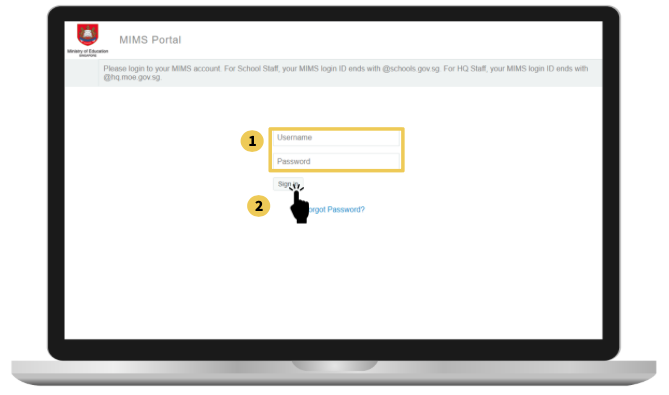
Input your username and password
Click sign in to login. After logging in, you'll be on the MIMS dashboard. Select "MIMS Identity Portal."
MIMS Identity Portal
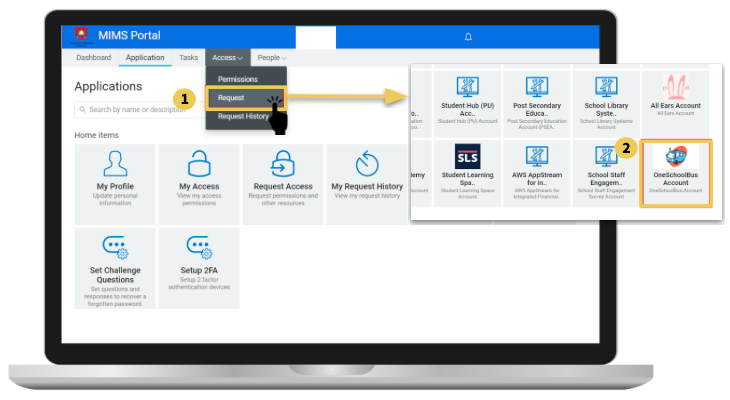
Tap on Access and then click Request.
Scroll down to find the OneSchoolBus app. Click on the OneSchoolBus Account icon, and a pop-up will appear below.
Fill in the reason for your request and
Click on Request. Your request will be submitted to school leaders for approval.
Note: After requesting, inform your school leaders and wait a few days for the school leaders to review your request and be approved.