
Create Bus Routes (Manual entry)
Follow these step-by-step instructions to create and manage bus routes manually in OSB, including adding stops, editing route details, and deleting routes.
Last updated 10 June 2026
Creating Bus Routes (Manual Entry)
This page provides step-by-step instructions for manually creating and managing bus routes in OSB. The instructions cover tasks such as:
Creating new bus routes
Editing bus route information
Adding stops and students to a bus route
Add a new stop before or after an existing stop
Separate a student from a merged stop
Delete students/rows from the bus route
Change the order of the stops
Delete a route
Creating New Bus Routes
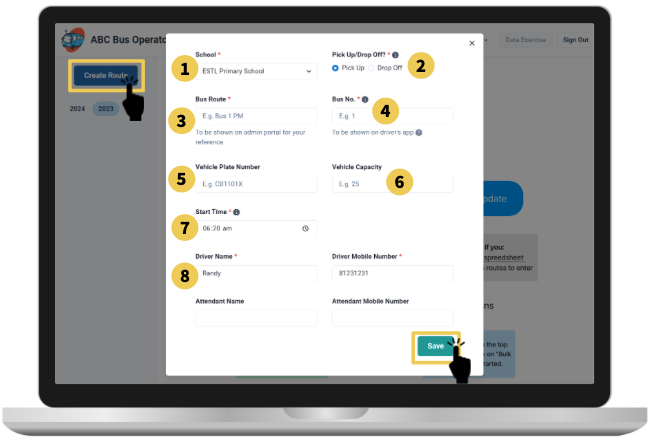
Click on the Create Route button on the left sidebar and fill in the fields on the form:
School: What school does this route serve? If your school is not on the dropdown, please contact the school’s Admin Manager to add you to the system. 2.Pick Up/Drop Off: The route is Pick Up if students are going to school, and Drop Off if the students are returning home.
Bus Route: The name of the bus route for your reference. (Example: AM1, AM2, PM1, PM2)
Bus No.: The bus no. will be reflected on the drivers’ attendance app. (Example: Bus 1, Bus 2)
Vehicle Plate No.: The license plate number of your buses.
Vehicle Capacity: The maximum number of students that can fit in your bus.
Start Time/Dismissal Time: If this is a pick-up route, start time refers to the time at the first stop. If this is a drop-off route, start time is when your bus leaves school.
Driver/Attendant Mobile Number: We use this mobile number for your staff to log into the attendance app, so make sure this is correct. For foreign numbers, add the country code in front, e.g. +60.
Press Save after you fill in the form. You will now see your created bus route.
Edit Bus Route Information
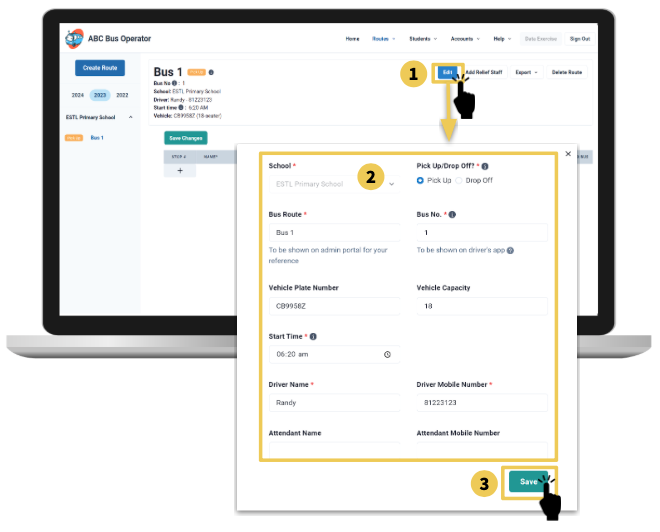
Click on the Edit button to the right of the route information.
A form will appear with the route information pre-filled. Make changes to the fields you desire.
Press the Save button on the form.
Add Stops and Students to the Bus Route
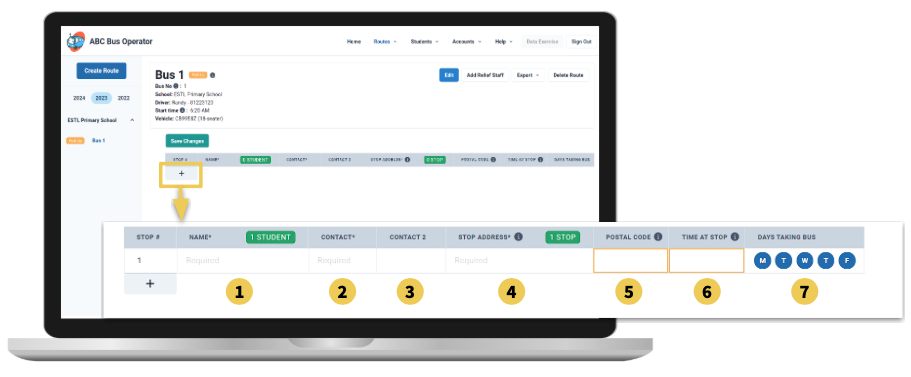
Click on the + button below the table header. An empty row will appear. Fill in the information of the first student in the cells of the empty row:
Name (Required): Student name
Contact (Required): Contact number for the parent of the student
Contact 2: The second parent contact number for the student, if any
Stop Address (Required): Address for the stop, e.g., 565 Balestier Road
Postal Code: Postal code for the stop
Pick-Up/Drop-Off Time: Scheduled time at the stop
Days taking Bus: Default is that students will be taking the bus every day. Tap M, T, W, T, F to turn off the student if not taking the bus on that day.
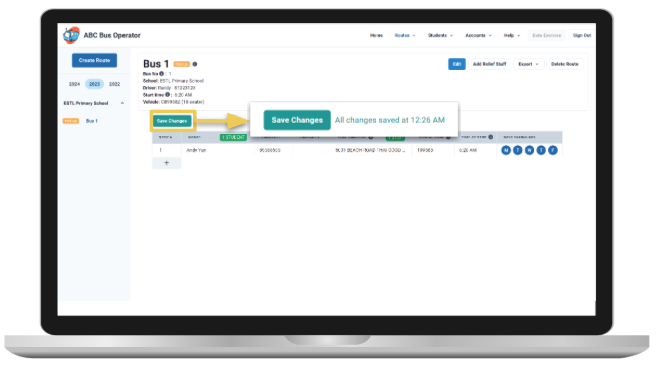
Press Save Changes button above the table.
Note:
You will only be able to save when you have filled in all required cells and there are no red boxes around any of the cells.
A red box around a cell means that there is an error. Hover over the red box for the error message and resolve the error accordingly.
An orange box around a cell means that there are additional actions necessary for the MOE HQ data submission exercise. Hover over the orange box for more information.
Adding Students to a Stop
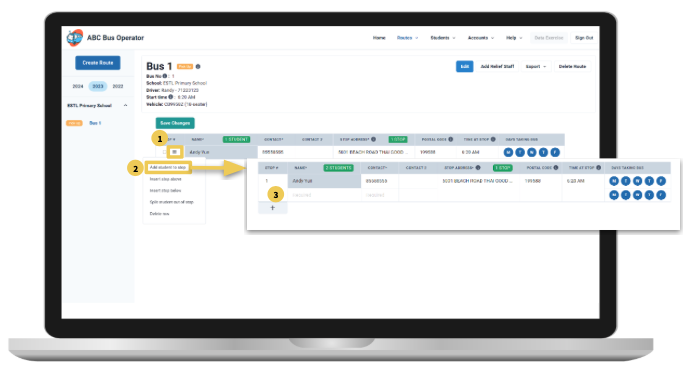
Hover over the first cell (Stop #) of the row. A checkbox and a menu button will pop up.
Select Add student to stop. A new merged row will appear below the current row.
Fill in the student’s name and contact.
Press Save Changes.
Add a New Stop Before or After an Existing Stop
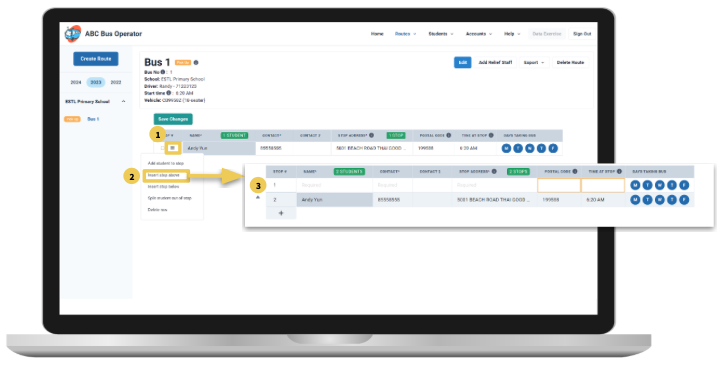
Hover over the first cell (Stop #) of the row. A checkbox and a menu button will pop up.
Select Insert stop above in the menu if you want to add a new stop before the current stop, or Insert stop below if you want to add a new stop after the current stop. A new row will appear before or after the current stop.
Fill in the student’s name and contact.
Press Save Changes.
Separate a Student from a Merged Stop
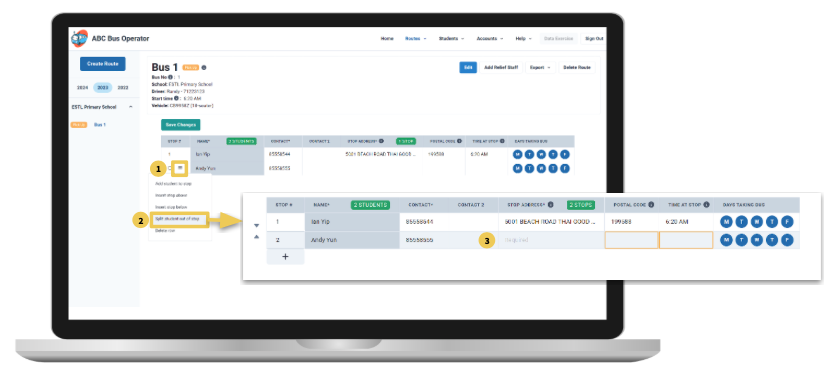
If you have multiple students being picked up or dropped off at the same stop, but one of the students is changing their stop, you can move the student out of that stop. Follow the steps below.
Hover over the first cell (Stop #) of the row. A checkbox and a menu button will pop up.
Select Split student out of stop. The student will now be moved to a new row.
Fill in the stop details.
Press Save Changes.
Delete Students/Rows from the Bus Route
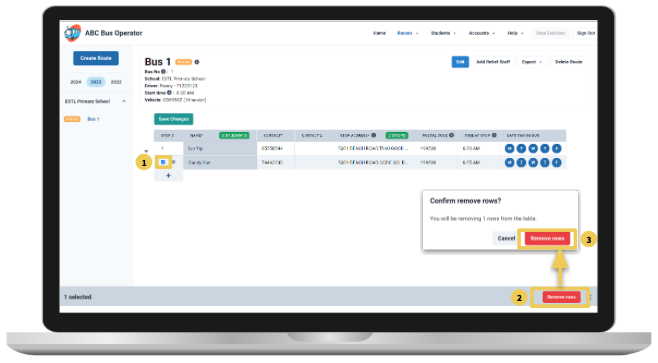
Hover over the first cell (Stop #) of the row. A checkbox and a menu button will pop up. Select the checkbox.
At the bottom of the screen, click on remove rows.
Click on remove rows again when the confirmation dialog appears, and the row will be removed.
Press Save Changes to save your changes.
Change the Order of the Stops
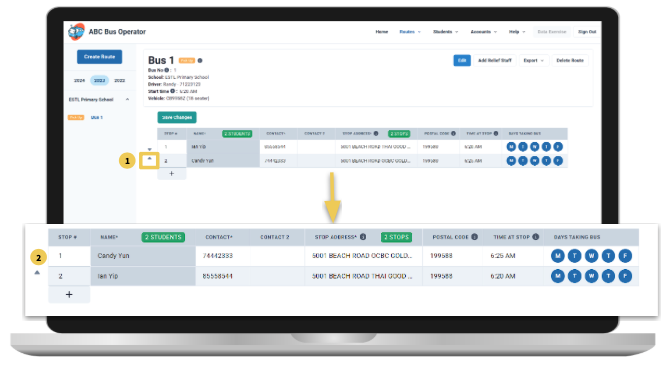
Click on the arrows to the left of the row.
The up arrow will move the stop up while the down arrow will move the stop down.
Delete a Route
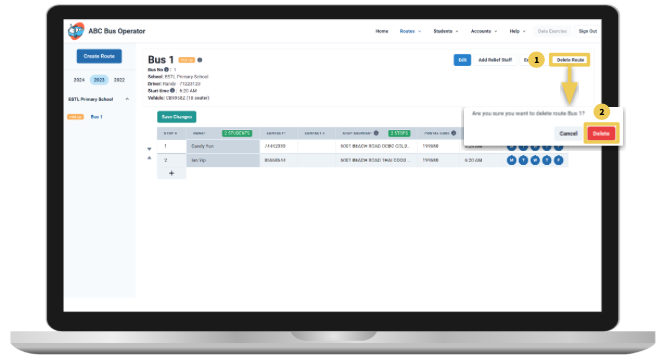
Click on the Delete Route button to the right of the route information.
A confirmation dialog will appear. Click on Delete to confirm. The route will then be deleted.