
Upload Bus Routes (Bulk update)
Use the Bulk Update feature in OneSchoolBus to upload or update your bus routes, driver, and student data all at once.
Last updated 10 June 2026
Upload Bus Routes - (Bulk Update)
On this page, you will learn how to upload or update a lot of data at one go in OneSchoolBus. This data comprises of your routes, driver, and student information.
Accessing the Bulk Update page and templates
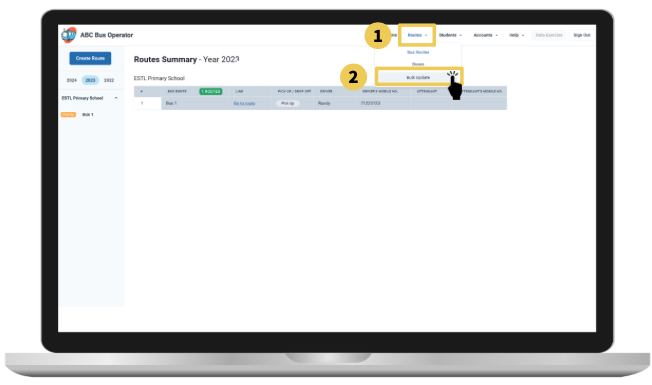
From the top navigation menu:
Click on Routes
Click on Bulk Update.
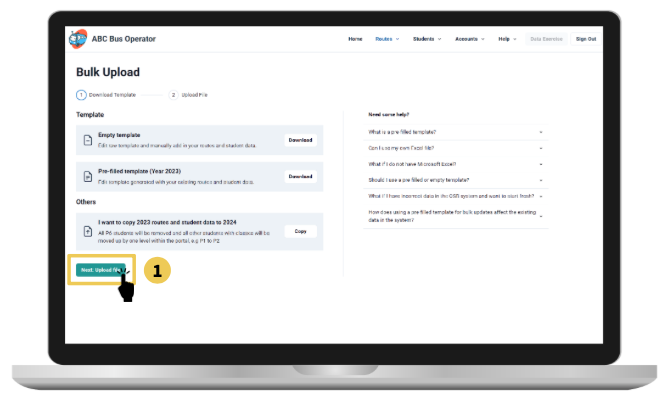
You will see the page Bulk Upload. Select the template you would like to download by following the following steps:
Empty Template: Edit raw template and manually add in your routes and student data.
Pre-filled Template (Current Year): Edit template generated with your existing routes and student data.
Download button: Tap on the download button to receive an excel template of your choice. You may proceed to open the excel template to make changes.
Next: Upload File: Once the excel template file is edited and changed, you may proceed to upload the file by tapping on this button.
Using the Excel template
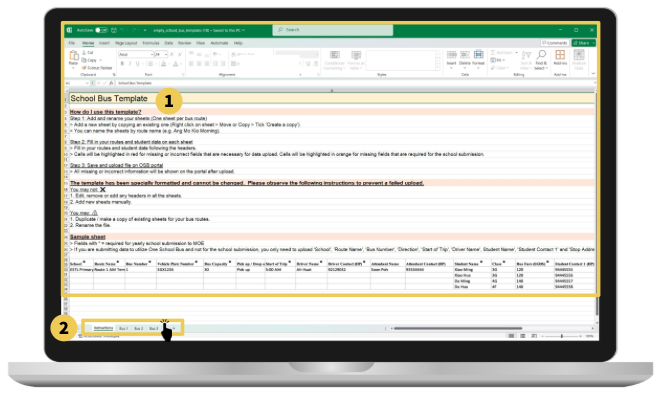
School Bus Template Instructions: The first sheet is instructions on how to use the template. Please read it carefully before filling in your data in the subsequent sheets.
Start Inputting Data: You may tap on the tabs below to start inputting bus route data into the template.
Note: Be prepared with a list of information such as Student Name, Parent contact, pick up address and time, to bus route names, vehicle plate number to driver and attendant name and contact number. You will be required to input these details.
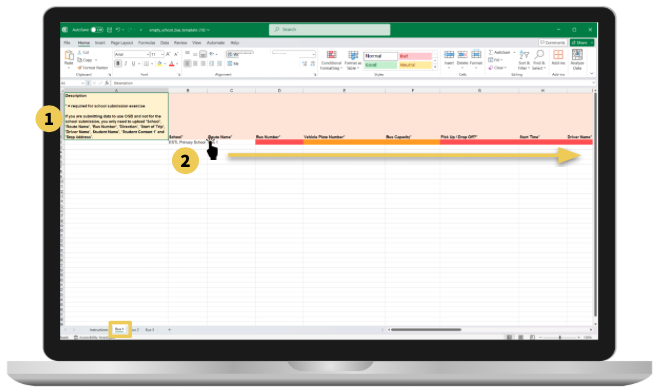
Description: Provides information on the required data to be input into this excel template. Red fields are compulsory, while orange fields are required only for the submission exercise sometime in February annually.
Filling in the Information: The fields are to be filled in across in the direction displayed in the screenshot above.
Note: You can upload more than 3 buses with the excel template. Although the downloaded blank school bus template only shows 3 buses, you may upload as many buses as you would like. Just duplicate existing lists to add more.
Note: You can duplicate lists for buses (IN) and (OUT). Right click on the desired bus route and click move or copy.
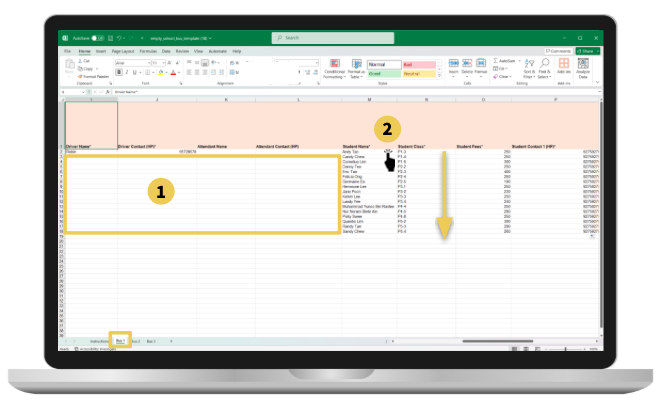
Fill in bus route details on 1 row: Do note that you do not need to drag route details for all student rows. You will only need to complete the first row and leave the rest of the cells blank.
Student Details: Each row starting from the student name column represents a student, and all columns should be filled up to minimize any missing data and upload issues later.
IMPORTANT: Remember to save your file after you have completed the template!
Note: If you are having difficulties with student class, remember that this is an optional field! Feel free to leave it blank. Our system may be able to autofill the value for you if it can find the student in our system.
Upload File
Once your template is ready, you may:
Click on Next: Upload file to upload your completed Excel Sheet.
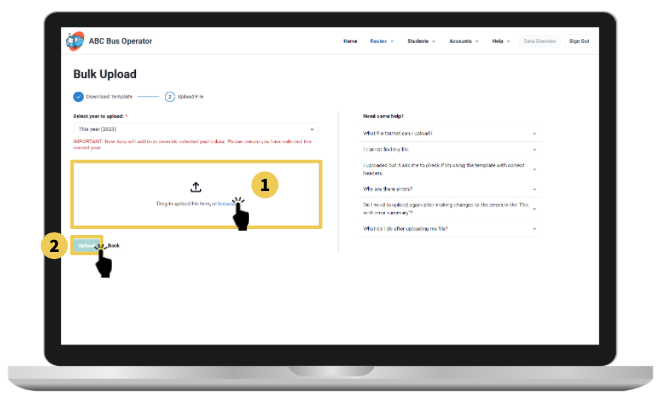
Click on the select drop-down to select the year you are uploading this template for.
Note: If you selected the wrong year, the existing data for the selected year will be overridden.
After selecting the year,
You may either browse to look for your excel sheet or you may drag and drop the file in the box indicated above.
Proceed to click Upload once the file is in.
If you have uploaded your file successfully, congratulations! Find your newly added information on the bus routes pages.
If not, don’t worry! The error pages will indicate what went wrong.
Error Page 1
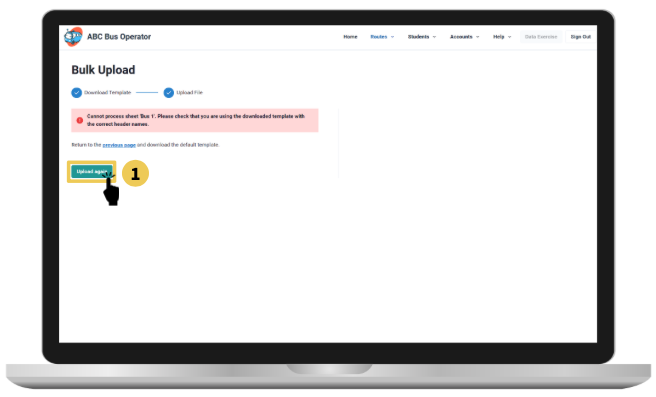
The first error shown above indicates that the original headers of the excel template have been changed, you will be required to redownload the default template and re-enter the data without edits to the main headers.
Proceed to click Upload again once you have made the necessary changes with the right main headers.
Error Page 2
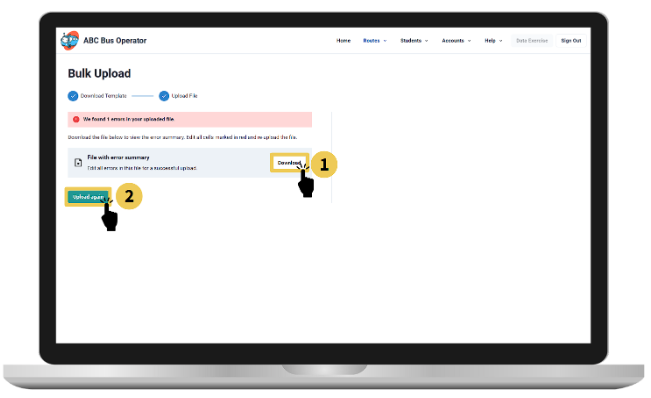
The second error shown above indicates that there are either some incomplete or unreadable fields within the excel template you have uploaded.
You are required to click download the File with error summary to edit the changes and save the file.
Proceed to click Upload again, uploading the edited File with error summary.
Note: The error summary page will point to you which sheet and row where the error is located. Correct the highlighted cells in your downloaded error file.
Note: The red highlight on the error file will not go away, but it does not affect your submission.
Copying this year data to next year
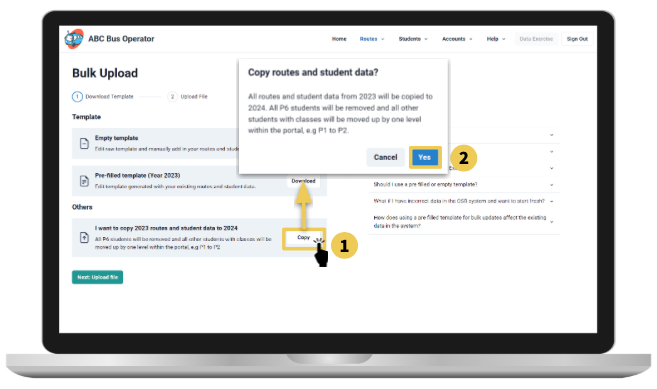
At the end of the year, you may carry forward the data with the following steps. Access the bulk upload page from the top navigation bar by clicking on Routes and Bulk Update.
Click on Copy
Click on Yes after the pop-up appears
Note: All P6 students will be removed, and all other students with classes will be moved up by one level within the portal, e.g., P1 to P2.